Never Miss Corner Bead in Your Material List Again
Accurate material takeoffs are essential for controlling costs and keeping drywall projects on schedule. While studs, drywall sheets, and fasteners are commonly included in estimates, corner bead is often overlooked or counted manually, increasing the risk of missing materials.
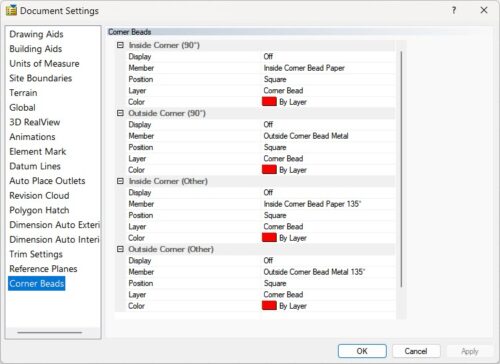
Envisioneer lets you specify the exact corner bead for each wall corner, ensuring that every type is automatically included in your material report.
Why Corner Bead Matters
Not every corner is finished the same way. Depending on the design and construction requirements, your project may use:
- Standard metal corner bead
- Bullnose corner bead
- Vinyl corner bead
- Paper-faced corner bead
- L-Bead
- J-Bead
- Specialty trim profiles
Each profile serves a different purpose, whether it’s creating a rounded corner, protecting high-traffic areas, or providing a clean finish around drywall terminations. If the wrong product is ordered—or worse, omitted entirely—the result can be project delays and additional material runs.
Assign the Right Corner Bead as You Design
Rather than relying on handwritten notes or reviewing drawings after the design is complete, Envisioneer lets you define the corner bead directly within the building model.
As you model your project, simply assign the appropriate corner bead to each corner based on your construction requirements.
The software keeps track of every selection throughout the design process.
Automatic Material Reports
Once the design is complete, Envisioneer automatically includes each corner bead in the material report.
This allows estimators to:
- Produce more accurate material takeoffs.
- Know exactly how much of each corner bead profile is required.
- Reduce forgotten materials.
- Minimize waste and unnecessary supplier trips.
- Improve estimating accuracy before construction begins.
Because the corner bead information is stored within the BIM model, your material list reflects the actual products specified throughout the project.
Save Time During Estimating
Manually reviewing every corner in a set of drawings takes time and increases the risk of mistakes.
By incorporating corner bead selections directly into the model, Envisioneer helps automate another part of the estimating process, allowing designers and estimators to focus on the project instead of counting materials.
See It in Action
Watch how Envisioneer assigns corner bead and automatically includes it in the material list.
🎥 Video Tutorial
https://youtu.be/jpnvZt8GJi8